You're sending emails through your ESP and suddenly notice deliverability issues. The problem might not be your content or list quality—it could be your shared IP address. Understanding the implications of shared IP usage is crucial for maintaining healthy email deliverability and protecting your sender reputation.
What Exactly is a Shared IP Address?
A shared IP address is an email sending address used by multiple senders simultaneously. Unlike dedicated IPs that belong exclusively to one sender, shared IPs pool the sending reputation across all users on that IP.
How Shared IPs Work:
- • Multiple senders use the same outgoing mail server IP
- • Reputation is collective - all senders affect the IP's standing
- • Managed by your ESP - they handle warm-up and maintenance
- • Common for low-volume senders - typically under 100,000 emails/month
The Advantages of Shared IP Addresses
1. Lower Cost and Maintenance
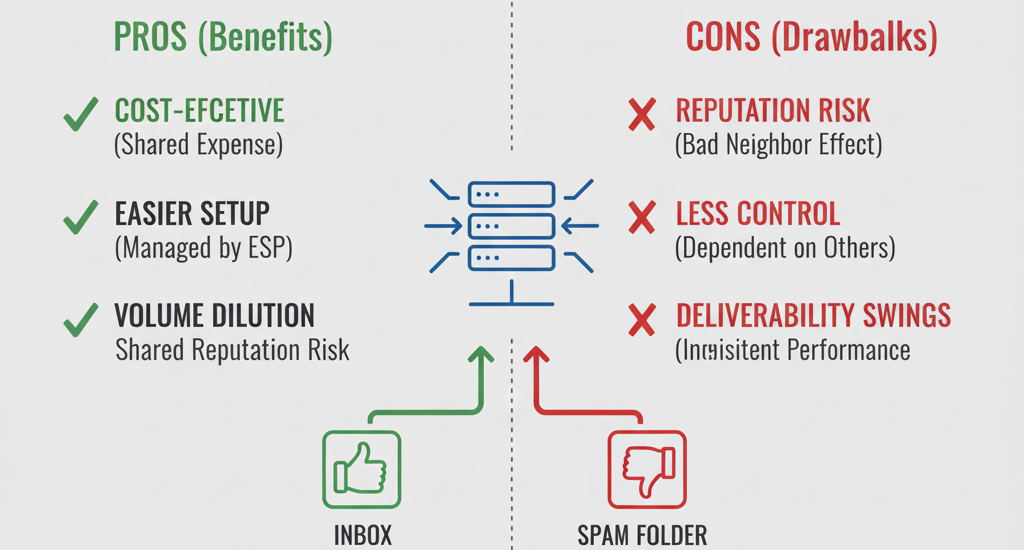
Shared IPs eliminate the need for expensive dedicated IP setup and ongoing maintenance costs. Your ESP handles all the technical aspects, including IP warm-up and reputation management.
Cost Savings: Dedicated IPs can cost $50-300/month extra, while shared IPs are typically included in standard ESP pricing.
2. Built-in Reputation Buffer
For new senders or those with inconsistent volume, shared IPs provide immediate access to established sender reputations without the lengthy warm-up process required for dedicated IPs.
Ideal For: Startups, seasonal businesses, and companies with fluctuating email volumes.
3. ESP Monitoring and Management
Email service providers actively monitor shared IP reputations and quickly address issues. They often have dedicated teams managing these IPs to maintain optimal deliverability.
Professional Oversight: ESPs can detect and isolate problematic senders before they damage the entire IP's reputation.
The Risks and Disadvantages of Shared IPs
1. Reputation Contamination Risk
One bad sender on your shared IP can negatively impact deliverability for everyone. Poor sending practices, spam complaints, or high bounce rates from other users affect your email performance.
Real Impact: Even with perfect sending practices, your emails could land in spam due to another sender's mistakes.
2. Limited Control and Visibility
With shared IPs, you have minimal control over reputation management and limited visibility into what other senders are doing. You're essentially trusting strangers with your email deliverability.
Monitoring Challenges: Difficult to track specific IP reputation metrics and impossible to control other users' sending habits.
3. Inconsistent Performance
Shared IP reputations can fluctuate dramatically based on other users' activities. One day your deliverability is perfect, the next it's compromised by someone else's poor practices.
Performance Variability: Unpredictable inbox placement rates and potential sudden drops in email performance.
When Shared IPs Make Sense: Ideal Use Cases
✅ Good Candidates for Shared IPs
- ✓ Low-volume senders (under 50K emails/month)
- ✓ New businesses building email programs
- ✓ Seasonal or irregular senders
- ✓ Companies with limited technical resources
- ✓ Budget-conscious organizations
❌ When to Consider Dedicated IPs
- ✗ High-volume senders (100K+ emails/month)
- ✗ Business-critical email communications
- ✗ Companies in regulated industries
- ✗ Experiencing deliverability issues on shared IPs
- ✗ Need complete control over sender reputation
Monitoring Your Shared IP Health
Key Metrics to Watch
- • Bounce rates - sudden increases signal problems
- • Spam complaints - monitor for unusual spikes
- • Open and click rates - drops indicate delivery issues
- • Blacklist status - regular IP reputation checks
- • Inbox placement rates - use seed testing
- • Authentication scores - ensure proper setup
Making the Switch: When to Upgrade to Dedicated IP
Signs It's Time for a Dedicated IP
- → Consistent deliverability issues despite good practices
- → Email volume exceeding 100,000 messages monthly
- → Business-critical transactional emails
- → Need for predictable, consistent performance
- → Regulatory compliance requirements
- → Brand reputation protection needs
Best Practices for Shared IP Success
1. Maintain Excellent Sending Practices
Even on shared IPs, your sending behavior matters. Maintain low bounce rates, minimize spam complaints, and follow email marketing best practices to be a good "IP neighbor."
2. Monitor Performance Regularly
Set up alerts for deliverability metrics and conduct regular seed tests to catch issues early before they significantly impact your campaigns.
3. Communicate with Your ESP
Ask your email service provider about their shared IP management practices. Inquire about how they monitor and maintain IP reputations.
4. Have an Exit Strategy
Know the signs that indicate it's time to upgrade to a dedicated IP and have a plan for making that transition smoothly.
Shared IPs: A Strategic Choice, Not a Compromise
Shared IP addresses offer significant advantages for many businesses, particularly those with lower email volumes or limited technical resources. However, understanding the risks and implementing proper monitoring practices is essential for maintaining optimal deliverability.
The decision between shared and dedicated IPs should be based on your specific business needs, email volume, and tolerance for reputation risk. For many organizations, shared IPs provide a cost-effective solution that, when managed properly, can deliver excellent email performance and reliable inbox placement.