How to Fix Google Workspace Storage Full: 5 Ways to Clear Space and Unblock Gmail

By: Author
Published: March 24, 2026
How to Fix Google Workspace Storage Full: 5 Ways to Clear Space and Unblock Gmail

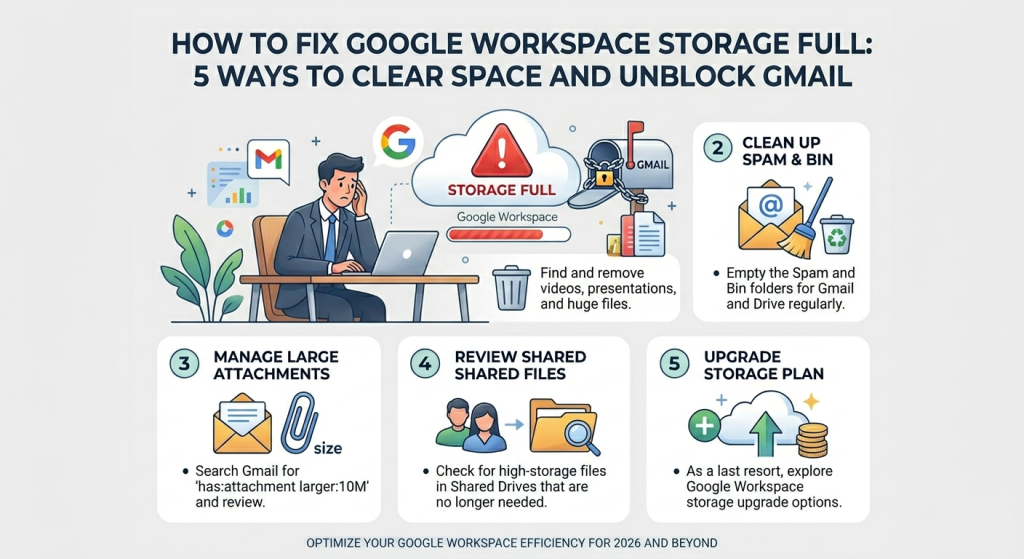
"When you see the "Storage full — you may not be able to send or receive emails" warning, it's not just a suggestion. In 2026, Google has tightened its enforcement of pooled storage. This means your 30GB (Starter) or 2TB (Standard) is shared across Gmail, Google Drive, and Google Photos. If one is full, they all stop working."

The "Storage Full" Crisis

When you see the "Storage full — you may not be able to send or receive emails" warning, it's not just a suggestion. In 2026, Google has tightened its enforcement of pooled storage. This means your 30GB (Starter) or 2TB (Standard) is shared across Gmail, Google Drive, and Google Photos. If one is full, they all stop working.

01. Purge Large Gmail Attachments

Most users don't realize that 10 years of email history isn't what's killing their storage—it's the 100 emails with 20MB PDF attachments. Searching manually is impossible, so you must use Search Operators.

has:attachment larger:10M

Paste this into your Gmail search bar to find every email over 10MB.

The 2026 Step-by-Step:

  • 1. Enter the operator above.
  • 2. Bulk-select the old threads you no longer need.
  • 3. Crucial: Go to the "Trash" folder and click "Empty Trash Now." Space is only reclaimed once the trash is empty.

02. Use the "Hidden" Drive Quota Tool

Stop digging through folders. Google has a dedicated "Quota" view that lists every file in your entire cloud by size, from largest to smallest.

Accessing the Quota:

  1. Navigate to drive.google.com/drive/quota.
  2. Identify "Zombie Files"—old video recordings or ISO images you forgot existed.
  3. Right-click and select Move to Trash.
  4. In 2026, check for "Shared Drive" bloat. If you are an Admin, use the Storage Management tool in the Admin Console to see which team member is "borrowing" the most pooled storage.

03. Convert Photos to "Storage Saver"

If your business uses Google Photos for field work or marketing, you might be storing massive RAW files. You can retroactively compress these to save nearly 60% of their space without losing significant quality.

The Setting to Toggle

Go to Photos Settings > Manage Storage.

Look for the "Recover Storage" or "Convert existing photos & videos to Storage Saver" button. This will compress your entire library in the background.

Why it works:

Google’s AI-powered compression in 2026 is so advanced that a 12MB photo can often be reduced to 3MB with zero perceptible detail loss on a standard monitor.

04. Rebalance the "Pooled Storage"

In 2026, Business Standard and Plus accounts use "Pooled Storage." If your CEO has 2TB of space and a junior designer has 2TB, they share 4TB. If the designer uses 3.9TB, the CEO's Gmail will bounce.

Action Admin Command Impact
Set User Limits Admin Console > Storage > Settings Prevents one user from "eating" the whole team's quota.
Audit Shared Drives Admin Console > Storage > Management Find old project drives that can be archived to Google Cloud Storage.

05. The Strategic License Upgrade

The 2026 "Sweet Spot"

If you are on Business Starter ($7/mo), you only have 30GB. In 2026, the jump to Business Standard ($14/mo) increases your storage from 30GB to 2,000GB (2TB).

That is a 66x increase in space for only $7 more.

"Upgrading usually unblocks your Gmail within 15 minutes, making it the fastest way to resume business operations."

The Executive Summary

Don't let a full Drive shut down your communication. Most storage crises can be solved in 10 minutes by running a larger:10M search in Gmail and emptying the trash.

Immediate Fix

Empty the Trash and Spam folders in both Gmail and Drive. These items count against your quota for 30 days unless manually purged.

Long-term Fix

Transition from Business Starter to Business Standard to enjoy pooled storage and a massive 2TB per user ceiling.

How to Google Workspace
Last updated: March 24, 2026
Tags: Blog Post